Skip to content

Blog

Introducing SongMatrix

I listen to music. A lot of music. If I’m in my home office I’m usually listening to a record, and if not, the radio. But I’ve always been an album person, not into playlist (or mixtapes to date myself). I’ve found by listening to albums front to back, I don’t always learn the song names.

Just a few weeks ago, I came across the shazamio Python library. I have a Raspberry Pi already sitting on my desk. I also have a couple extra 64x32 RGB Matrices and I recently picked up one of the new Adafruit S3 MatrixPortals, so I have the hardware and software to start a new project.

Enter SongMatrix (GitHub).

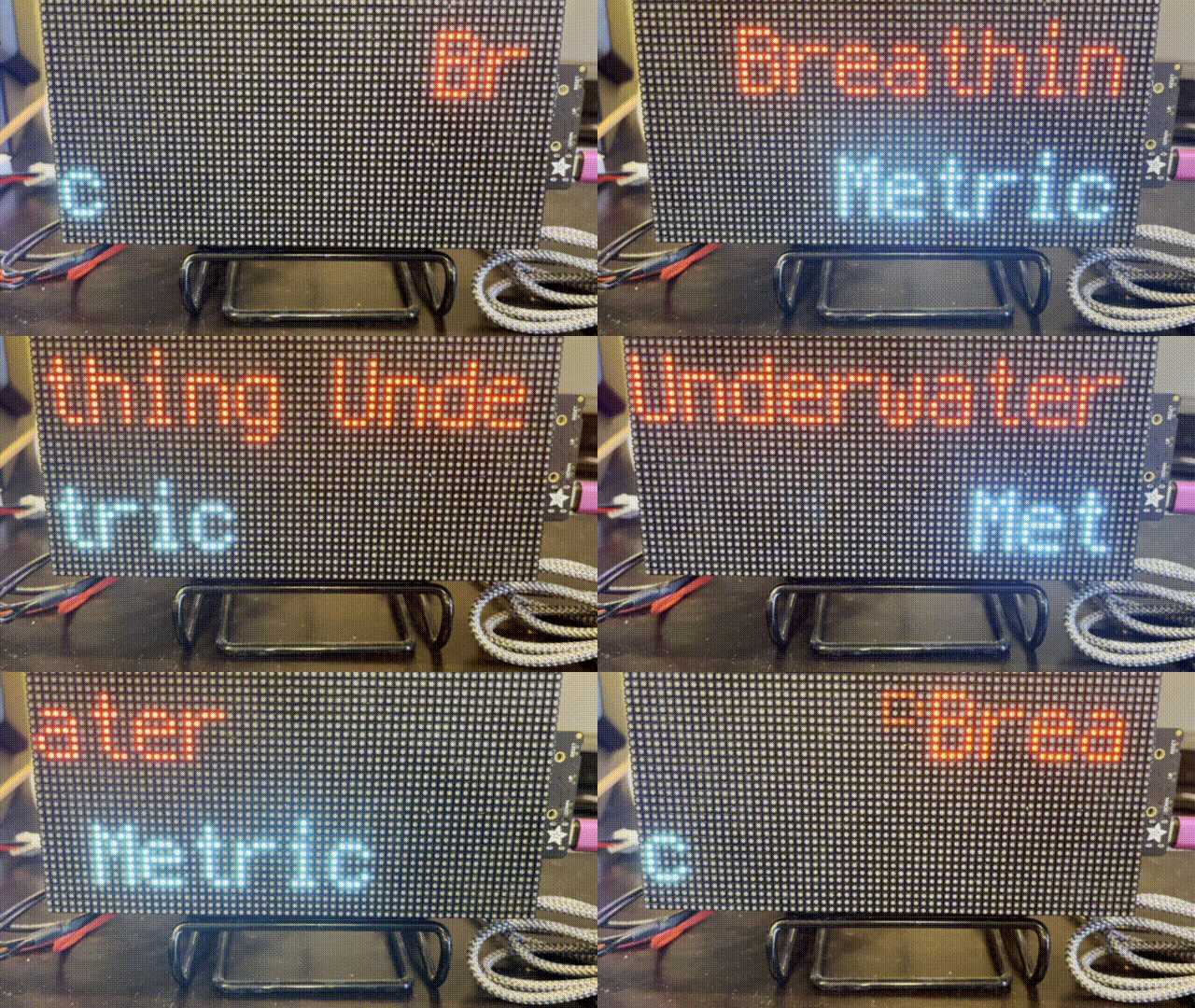
SongMatrix records a short audio sample on the Raspberry Pi and then sends it to shazamio to be identified. It then sends a MQTT message to Adafruit IO’s MQTT broker with the song title and artist. The MQTT message is received by the S3 MatrixPortal, which then scrolls the song and artist on separate lines, like so:

A 32x64 Matrix displaying the song Breathing Underwater on the top row and the artist, Metric, on the bottom row

I whipped up a proof of concept for the Python part of recording audio and sending it to shazamioin one Friday evening. The CircuitPython part took me a couple weeks and I’ll share some of the challenges in upcoming blog posts (no promises).

A special thank you to todbot for bootstrapping some asyncio code to get me started. And to anecdata for spending a good chunk of yesterday helping me get around the last issue and getting to done. (Well, it’s never done).

MatrixPortal Album Art Display

A year and a half ago I made some progress on displaying album art on a MatrixPortal and 2 32x64 RGB matrices using CircuitPython. I was never really happy with the results and using two 32x64 matrices instead of one 64x64 matrix was difficult. I moved on and re-created the project using a PyPortal Titano. It worked well: when I chose an album I wanted to listen to SilverSaucer.com, my FastAPI web app would convert the image and send a MQTT message. The PyPortal would listen for the message, and when a new message arrived, download and display the album art along with a Winamp skin that also showed the artist and album name. I should have blogged it and taken a picture!

When Adafruit announced the new S3 MatrixPortal with so much memory - 8MB flash and 2 MB of SRAM, I decided to try again. My hope was that with that much memory, I could download and load the image into memory without having to save it.

I haven't figured out how to do it without saving the image to the MatrixPortal yet, but I was able to repurpose my original code and had it up and running in just a few minutes.

Now came the hard part: adding gamma correction to the image so it looks closer to normal on the MatrixPortal and not washed out. Adafruit has a great Learn Guide for Image Correction for RGB LED Matrices. The guide includes a CPython program that uses Python's PIL / Pillow library to manipulate the image and some logic to apply gamma correction.

I needed to re-create that program, which used command line arguments where you would pass the image name to the program, as one function within my FastAPI app. It took a few days of banging on it (and a few hours lost to a wrong indent(!)), but I got it. The get_discogs_image function downloads the given image and converts it from a 600px image to 320 x 320px (for the PyPortal) and a 64x64 image for the MatrixPortal. The process_image function then takes the 64x64 image and applies gamma correction and saves a new copy (which the MatrixPortal will download and display).

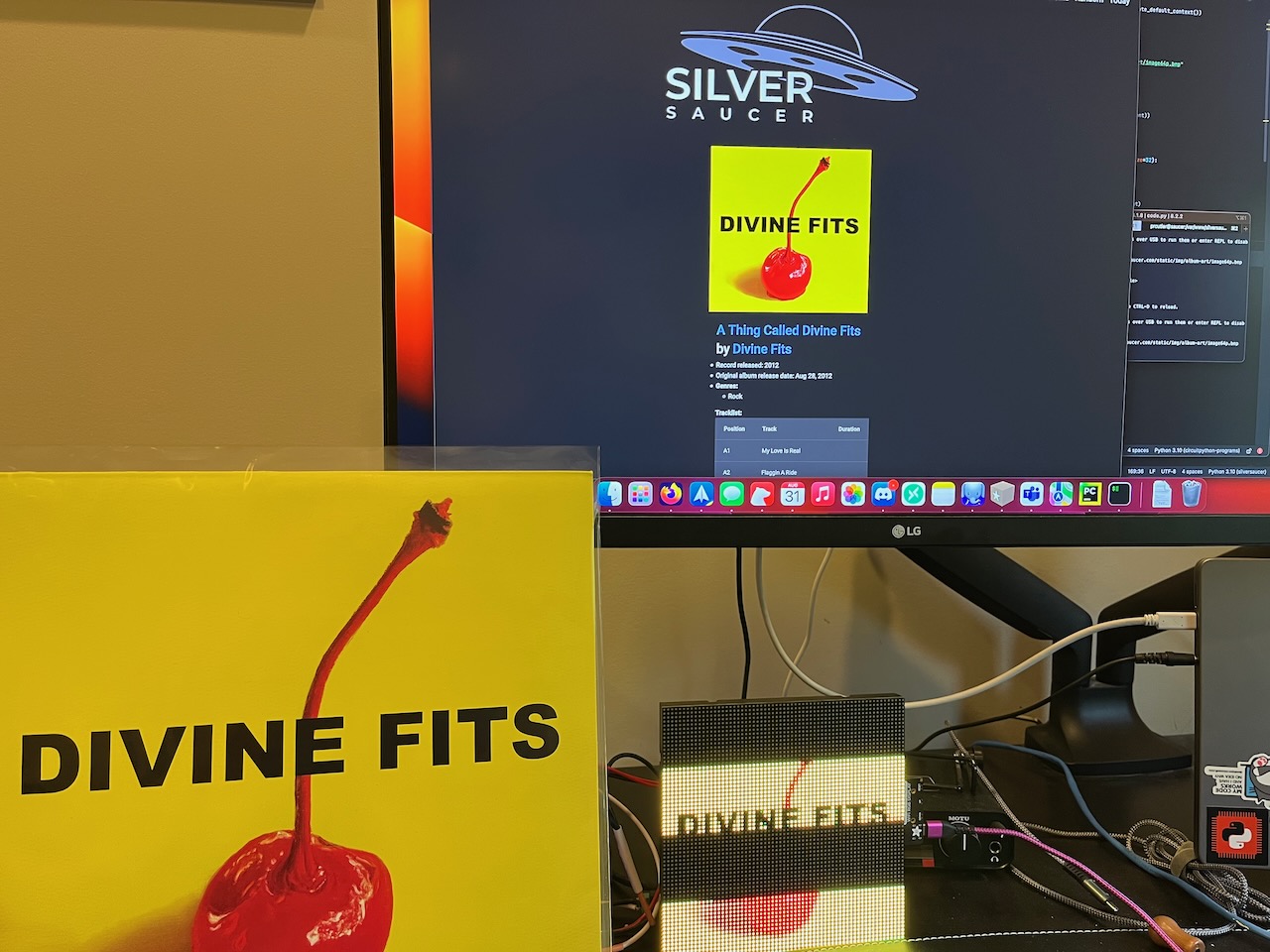
Some albums look a lot better than others. Considering it's a 64x64 image, it's practically pixel art at this point. It's too bad that it's difficult to photograph RGB matrices, but here is a picture showing Divine Fits' album, it being chosen on SilverSaucer.com, and the converted image being displayed on the MatrixPortal.

Divine Fits

The CircuitPython Show Returns

After being on hiatus since December, I'm happy to share that The CircuitPython Show returns this coming Monday, April 10th.

I've got some great guests lined up, including authors, board designers, developers, and more.

Make sure you're subscribed in your favorite podcast app and the new episode will hit your earbuds this Monday!

Thanks for listening.

Favorite Albums of 2022

I shared this on Mastodon, but in an effort to (maybe) blog more, here are some of my favorite albums of 2022. I'm sure I'm forgetting some. In no particular order:

  • Spoon - Lucifer on the Sofa
  • Metric - Formentera
  • Muna - Muna
  • Yeah Yeah Yeahs - Cool it Down
  • Frank Turner - FTHC
  • Taylor Swift - Midnights
  • Chastity Brown - Sing to the Walls
  • Hatchie - Giving the World Away

Spoon gets a special mention - the remix album, Lucifer on the Moon, is just as good as the original.

The CircuitPython Show Year One

As 2022 comes to a close and I look back at the first year of The CircuitPython Show, I just wanted to say thank you.

Thanks to everyone who listened to the podcast, was a guest, or left a review. The support I received was phenomenal - thank you!

After wrapping up season 2 a few weeks ago, the show will return in 2023.

Next CircuitPython Projects Up

I couldn’t resist the recent holiday sales and I bought a few parts for my next two CircuitPython projects.

First up, is re-creating my Pi-Dial project using CircuitPython on a microcontroller instead of a Raspberry Pi and Python. This project controls Zone 2 of my home theater receiver, which is my home office.

Parts used include: * ESP32-S3 microcontroller (because it has WiFI and I already had a couple on hand) * 4 key NeoKey (used to change the inputs, such as CD, Phono, or Tuner and mute) * 1 Rotary encoder (to change the volume) * 1 2ā€ TFT screen

I already had a prototype working with the NeoKey and rotary encoder using the ESP32-S3. CircuitPython can send serial commands to my Denon receiver and I can do all of the functions I need, including changing the volume, inputs, and muting or unmuting the receiver.

For an enclosure, I’m going to use repurpose the WalkMP3rson project from Adafruit and 3D print a retro Walkman style player. I’ll need to modify it to permanently add the USB-C cable for power as it won’t be battery operated.

The biggest thing I have to learn is displayio. I don’t have any experience using displays in CircuitPython, but I’m excited because the WalkMP3rson project has a bunch of code I’ll be able to re-use.

Work in progress on the breadboard

My second project will be an IoT sensor to detect when I’m running low on water softener salt. I purchased a Time of Flight sensor that can measure the distance and connects to an ESP32-S2 Feather. It will then report back via MQTT the current measurement. I’m already running Home Assistant and I’ll set it up to report the measurement daily to my dashboard. I’ve used MQTT in one other project, but I’ve never integrated with Home Assistant. The biggest challenge so far is finding a 3D printed case that can hold both the Feather and a battery.

Those should keep me busy for a while. At least over holiday break!

Introducing The Bootloader

Having just passed the six month anniversary of The CircuitPython Show, I’ve decided to start a new podcast!

Introducing The Bootloader.

I’m teaming up with Tod Kurt and together we’re going to bring you a few interesting things we found around the web. We’ll each share up to three things, each one for a few minutes, but no more than five. That should keep the show right around a half hour, which is optimal.

The three things can be almost anything. It could be a news item, we could share a project we came across or following, we might highlight a maker and their work, or we could talk about a product we love (or hate). It could be news, it could be something older that’s new to us. Hopefully you’ll find it interesting, too.

You can subscribe to the podcast on all major platforms or via RSS (we'll be on Google Podcasts soon, but just add the RSS to your podcast app), follow us on Twitter, watch us on Youtube, or visit our website.

Give us a listen and watch the trailer here!

Six Months of The CircuitPythonShow

Today marks six months since the first episode of The CircuitPython Show dropped.

(Of course I haven’t blogged much about the show since then…)

I’m not even sure where to start. I think the show has found its groove now. From the feedback I’ve received, people seem to like the shorter interview format rather than the longer interviews the first few episodes featured.

It’s been pretty cool having the opportunity to meet and chat with community members on the show. I hope that comes through in the episodes as the big goal for the show is to highlight those in the community and get to know them in a different way than just their CircuitPython contributions.

In other news, I switched podcast hosts last week and went all in on Zencastr, which I already used for recording. This coming Monday’s episode will be the first episode distributed by them, so cross your fingers.

Thank you to everyone who has listened, told a friend, or guested on the show. I especially appreciate the comments and feedback about the show, keep ā€˜em coming! And don't forget to subscribe in your favorite podcast app...

SilverSaucer completed!

Just like that, I crossed the finish line and SilverSaucer.com is finished. I wasn’t planning on finishing it so quick after my blog post, but on Friday it just clicked and the ā€œOn this dayā€ feature was completed in just a few hours.

I always thought the ā€œOn this Dayā€ feature was a pipe dream. I had no idea how I was going to tie a Discogs release to MusicBrainz and then import that date. But after discovering the discodos app a few weeks ago and working with the database having clicked last week, I was able to finish it up after discovering a key feature: the LIKE operator in SQL and SQLAlchemy.

``` today = pendulum.today(tz="America/Chicago") print("Today: ", today, today.month, today.day)

if today.month < 10: search = "0" + str(today.month) + "-" + str(today.day) else: search = str(today.month) + "-" + str(today.day)

async with db_session.create_async_session() as session: query = ( select(Album) .filter(Album.mb_release_date.like(ā€œ%ā€ + search)) .order_by(Album.mb_release_date) ) print(query)

results = await session.execute(query)
query_results = results.scalars()

The Pendulum library comes to the rescue again as it is still my favorite way to work with datetime objects.

This returns a list of rows from the database where the results are today’s date, not including the year. (There is one bug related to 6/18 I can’t track down where it displays a different result - but not both - when an order_by is added to the query).

I’m pretty happy with how everything has turned out. I’ll probably do a couple more blog posts about the project, including reviewing the project goals.

It feels weird to be done. Not necessarily elation, not relief, just weird.

June 2022 SilverSaucer Update

As usual, I haven’t blogged my progress on SilverSaucer and I’ve had some major progress since January.

First, I did follow-up on that blog post by switching from a MatrixPortal with a 64x64 LED to a PyPortal Titano.

Liz Phair's self titled album displayed on a PyPortal

In FastAPI, I did two things. I added a service that uses the Pillow library to convert the image from the Discogs image URL to a small bitmap that the PyPortal can use.

The second thing is that sends a message using the MQTT protocol. The PyPortal is watching for that message, and when received displays the Bitmap like above.

async def get_discogs_image(release_image_url): image_dl = requests.get(release_image_url, stream=True).raw download = Image.open(image_dl) download.save('static/img/album-art/image_600.jpg')

img = Image.open('static/img/album-art/image_600.jpg')
img.quantize(colors=16, method=2)
smol_img = img.resize((320, 320))
convert = smol_img.convert(mode="P", palette=Image.WEB)
convert.save('static/img/album-art/image_300.bmp')

async def publish_image(image_url): client = mqtt.Client() client.username_pw_set(config.mqtt_user, config.mqtt_pw) client.connect("mqtt.silversaucer.com", 1883) client.publish("albumart", "Ping!") client.disconnect()

That was a pretty big breakthrough to get hardware working with the website back in April or May.

I then spent early last week playing with a command-line tool called discotools. I help with a little of the documentation in the python3-discogs-client library and one of the co-maintainers wrote discodos for DJs to catalog their collection. It also has the ability to match Discogs Release ID to MusicBrainz ID and using it I was able to get about half (or 400) of my MusicBrainz IDs assigned into the database. (Which is a different story about doing unnatural things with tables).

Then in the last week or so, everything has started to come together. Last week I was struggling with understanding the different kind of objects database queries could return. I was having a hard time understanding and differentiating between scalar, scalars, one_or_none, and lists. That finally clicked and in a couple of days I had re-written the random results page to mostly use the database and the page load time went from about 10 seconds down to about 2 seconds, a huge improvement. After the initial database import, which takes forever as Discogs rate limits you to one request per second, the play-album page uses the database for all information except the genres and tracklist, which are still called using the Discogs API. It turns out that the Discogs API is very slow when querying an object in your personal collection. If you do a general query on a public release object, it’s way faster. The combination of those two things led to the speed improvement.

From there I was able to quickly re-factor the play-single method to match the play-album, so I can randomly return an EP or single to play. Understanding the database query, I also added a list result to the admin page showing a list of all releases that don’t have an associated MusicBrainz ID. Last night in just hours I created the template with form and the get and post methods to manually enter the ID and store it in the database.

I also wrote a method that for the existing database entries that have the MusicBrainz ID, to query the MusicBrainz API and get the release date for that album. It worked, but the dates the API has stored include the year, year and month, and year, month and date, which is what I really want. But just like that, over half the work to build the ā€œOn this Dayā€ feature has been done and I just need to manipulate the dates above to get the one I want.

The finish line is in site.