Skip to content

2018

It was a good week of Python and me

It was a good week for Python and me.

In no particular order:

MLBPool2

I pushed a major re-write of MLBPool2 to production just days before the baseball season ended. Why didn’t I wait until the baseball season was over before pushing a major update? Because MySportsFeeds this summer upgraded their API from 1.x to 2.0 and it included a big change to how they track team standings, especially playoff standings. To give MLBPool2 players better visibility to how they were doing, it was important to get the update out there. There were a few more things pushed in that update which deserve their own write-up.

100 Days of Python

I started the 100 Days of Python training from Talk Python and Pybites. The first couple of days are training on the ``datetimemodule, which just reinforced to me how much more I like Pendulum. I haven’t been updating the daily log (or tweeting), but I have been working on Python daily.

Pyramid Documentation

I mentioned in my last blog post a few weeks ago how I’ve been learning about testing. One of the things I noticed when reading up on Pyramid and pytest was that the Pyramid documentation refers to pytest as py.test in its documentation, which is an old way of doing it.

GitHub and partners started Hacktoberfest this week, so it was a perfect time to go through all of the Pyramid documentation and update it. So I did, and it was a good learning opportunity. It’s not as simple as an easy search and replace - reading through the docs to make sure the changes are done right also teaches me about the features, and learning about pytest and especially coverage was great. Talking to the developers, Pyramid has a 1.10 release coming very soon, so I got those changes in and then dived into another discussion topic on IRC, cookiecutters.

With the upcoming 1.10 release, Pyramid will be merging three of it’s cookiecutters into one. Even though we’ll update the documentation, including the README, there are probably some developers who have a workflow to just pull the cookiecutter from the command line. I added a message to the two deprecated cookiecutters that they are deprecated and to use the correct one. I did spend some time going through the Talk Python course on cookiecutters, which was good, too. I was looking for a way to update the pre-commit hook to add the deprecation message, but no luck on that.

And speaking of Hacktoberfest, I met the goals! (Not that I’m done yet).

It was a good week.
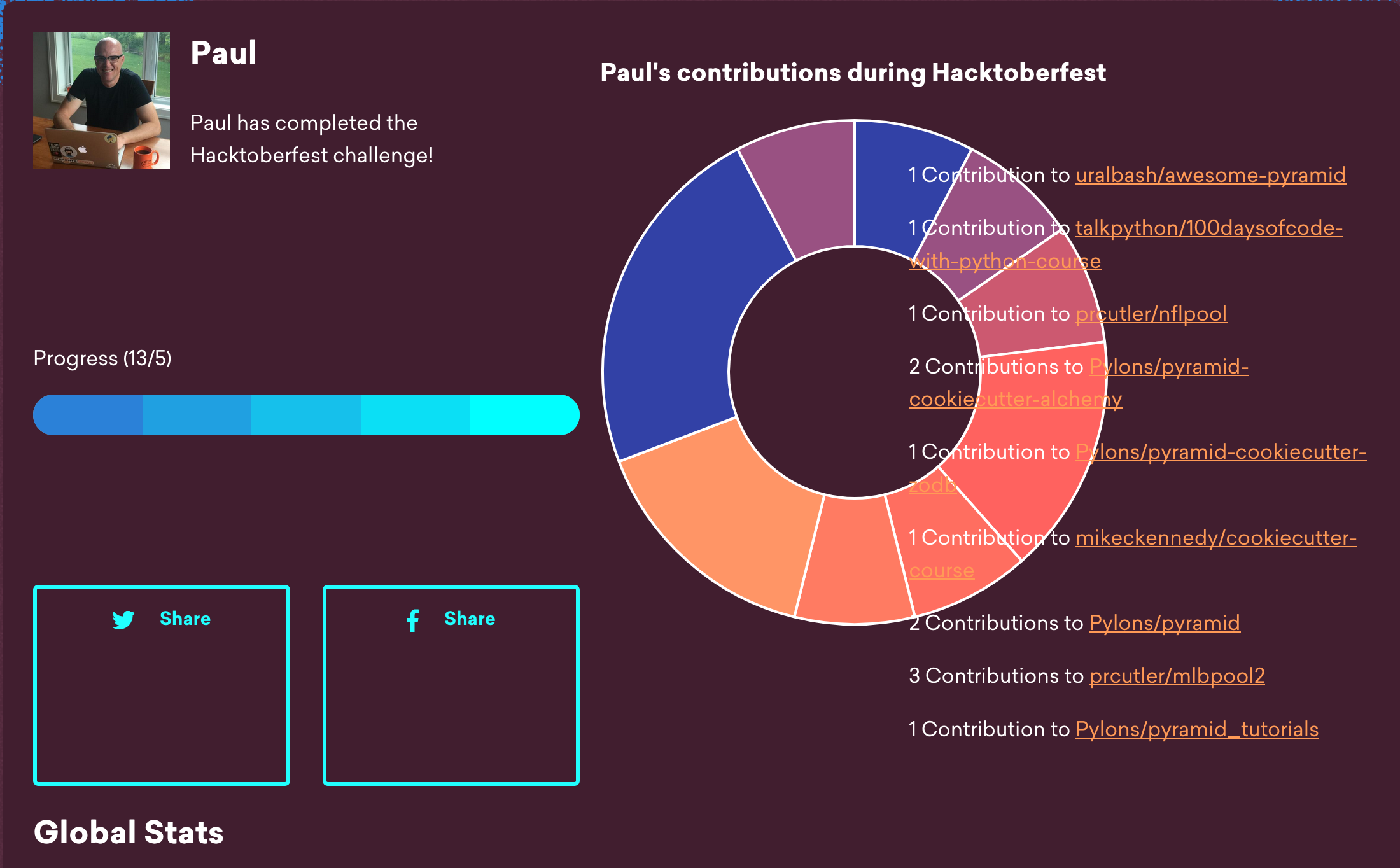
Hacktoberfest 2018

There is No Offseason

Alternative title: There is No Offseason (or writing my Python apps never ends and that's ok)

The blogging might slow down some, but the coding never stops. Ok, well maybe a little. After creating and launching MLBPool2 this past spring, I took a small break and then back at it for the upcoming season of NFLPool.

I have two big goals for NFLPool before the 2018 season starts:

  1. Fix the time / timezone issue where a player tried to submit his picks before the first game of the season started to, but was denied. Rip out all references to Python’s datetime module and replace it with the Pendulum module instead.
  2. Allow NFLPool players to make changes to their picks if the season hasn’t started yet. This build on existing functionality in MLBPool2.

And a few smaller things to add including some updated admin functionality. I didn’t get to a few of the big things I wanted to do this offseason, which included unit tests and porting to MySQL. But it’s good to have goals for next offseason.

I’ll be writing about some of the changes over the few weeks leading up to this season’s kickoff.

Python Dev Kit Humble Bundle

Humble Bundle has done it again. They’ve released an awesome bundle of Python trainings, books and tools all for a low price and also supports charity!

Included in the bundle are three trainings from Talk Python (which I’ve already raved about a lot). I’ve been an ardent supporter of Talk Python trainings and have recommended them numerous times on the Python subreddits, and usually get comments that they’re so expensive (when compared to Udemy’s “sale prices” of $13). But they’re worth every penny and now people have a chance to get three of them for just $20.

But wait, there's more! Fluent Python, which I have not read, but is almost always one of the most highly recommended books for intermediate Python programmers and up is also included. Dan Bader’s Python Tricks book, Matt Harrison’s Illustrated Guide to Python 3 and Thoughtful Machine Learning by Matthew Kirk are also included. I’m personally excited to get Matt Harrison’s book - Talk Python launched a new training this week and if you buy it within the first week that book is included. I’m going to buy the Talk Python Everything Bundle in a month, so I would have missed out on the promo to get the book, but now I get it anyway!

You also can get a number of software tools. A 1 year subscription of Postman Pro is included - I’ve used the free version since Talk Python introduced it to me. It’s been fantastic for learning the MySportsFeeds API and looking through rows and rows of JSON. I’m curious to see what the Pro version brings. GitKracken looks interesting, but PyUp is one I really want to try out.

Last, but not least, is a 6 month subscription to egghead.io, featuring video tutorials to learn JavaScript. I wanted to get better at Python before learning JavaScript, but this makes starting to learn it a no-brainer.

Even though I have two of the three Talk Python trainings in the bundle, a PyCharm Pro license and am an existing DigitalOcean customer, it’s still an unbelievable deal. Go get it now! (Not an affiliate link).

Password Validation in NFLPool and MLBPool2

When I first learned to work with Pyramid thanks to the Talk Python course Python for Entrepreneurs, I used the account registration system directly from the course for NFLPool. When I wrote MLBPool2, I augmented it to require the user to use a much stronger password than the course taught. (You can see the original code from NFLPool here).

In MLBPool2, I required the user to use a password between 8 and 24 characters and it must have at least one lowercase letter, at least one upper case letter, a number, and a symbol:

A nice error message is shown each time the user doesn’t do it correctly. I was pretty proud of myself for figuring this out (and for using Stack Overflow to get some tips on how to do it).

But…. It hit me a couple weeks ago that it works great for user registration, but if they lose their password or want to reset it, none of that functionality is there. When resetting a password, the user clicks the reset password link which emails them a one-time link to reset their password. And none of the password requirements I was so proud of are in the methods for resetting a password.

It’s going to require a big re-write - right now it only has one input field for the new password. I’ll need to add a second field to require the user to enter the new password twice (similar to registration) and then add all of the requirements and the error messages to the viewmodel. So I’ll be working on that over the next week or so.

NFLPool - The Work Continues

For once in my life, I’m not procrastinating. With the NFL season just over four and a half months away, I’ve already started on working to update NFLPool.

I’m really enjoying working with Python and don’t want to let the few things I’ve learned get rusty. This includes back porting a number of updates from MLBPool2.

I've updated the Standings page to display all seasons played (before it defaulted to just the current season). This uses traversal in Pyramid to create a GET request based on the season year and automatically creates the links. This feature within Pyramid is so cool, I guess I should expand on it:

I have a standings_controller.py that creates all of the routes for the pages in Standings:

I call the StandingsService to get a list of all the seasons that exist in the database to create the index page and it shows a bullet list of each season. (Currently, this returns the one season that has been played, 2017). You can see it in action here.

You can then click on the 2017 bullet to see the player standings for the 2017 season. The code for the player standings in each season looks like:

The cool thing is season = self.request.matchdict['id'] above - when the user clicks on 2017, that’s passed to this method, that passes 2017 and makes season equal to whatever bullet the user clicked on in the list on the Standings index page, which is 2017 in this example and returns the 2017 Standings. The rest of the code passes the season variable (which is now 2017) to the database to show all of the players and their score for the 2017 season. I also updated the template that if the week is 17 or greater (there are only 17 weeks in an NFL season), the header on the page now says 2017 Final Standings, otherwise it would return 2017 Week x Standings, where x is equal to whatever week the standings have been updated through. This was helpful as last year there was an issue with how division standings were pulled from MySportsFeeds because they don’t calculate the tiebreakers in their API and they had to fix it - after they fixed it, I updated the stats from their API, but now it was “Week 18”, which technically doesn’t exist in the NFL. Now it just says final.

I also added Slack messaging that is present in MLBPool2. When a new user registers or submits their picks, I get a message in my NFLPool Slack channel.

A minor thing, but when players are selecting the NFL player they think will win in a category (such as who has the most passing yards), the dropdown box that shows a list of all NFL players now includes the player’s team and position in addition to the player’s name. Another small thing is the site administrator can update when a player has paid the annual league fee and when the admin updates to a new season the list players who have paid is reset.

Last, but not least, I’ve been working on documentation. I had already written the User Guide on how to play and make your picks, and over the last week I’ve added an Administrator’s Guide, including how to install, first time setup, how to update to a new season and how to manage NFLPool players. This is all written in reStructured Text and uses Sphinx to create the documentation and is hosted on ReadTheDocs. I still need to write the developer documentation - I have no idea how to write developer docs and am still looking for some good examples of developer documentation to crib from.

It’s a good thing I’m using Github’s issue tracker - a couple of those fixes above I had added last September after NFLPool launched and probably would have forgotten about. Between that and the documentation, it’s almost like I’m running a real open source project!

The work doesn’t end there, though. The big one I need to add the TimeService and GamedayService to make datetime management easier, especially for calculating when picks are due and displaying it on the pick submission page. I also have a couple of more bug fixes to get to and I’d like to add Twitter support to the app as well. The journey never ends.

Goodbye Wordpress, Hello Hugo

I’ve been using Wordpressfor over 15 years. In fact, I started blogging before Wordpress existed, and even used b2 / cafelog, from which Wordpress was forked.

But over the last couple of years as I’ve maintained three separate Wordpress sites (the first for paulcutler.org, then Stone Open, and later MLBPool2 (which is now using Pyramid instead), I’ve had constant crashes and memory issues. I don’t know if it’s because of the number of blog posts I have, but both my personal blog and Stone Open have tables corrupted and I have to go in and fix them whenever the site crashes.

That, combined with the constant updates for Wordpress and it’s plugins, as well as security fixes, made me say enough is enough.

I’ve been looking at Hugo (written in Go) for the last month or so to replace Wordpress with. I also looked briefly looked at Jekyll and Pelican, which are also both static site generators. Pelican interested me, as it is written in Python, but Hugo seems to be a bit more actively maintained.

As of this morning, paulcutler.org is now running Hugo. I updated the web server, installed a new SSL certificate (thanks Let’s Encrypt!) and moved it to my other DigitalOcean droplet that serves MLBPool2.com and NFLPool.xyz.

One of the advantages of using Hugo is that all of the blog posts are written with Markdown. I’ve been using Markdown more and more, as most of the daily apps I use on macOS use Markdown (Day One, Bear Notes, and Ulysses (which I’m using to write this now with).

I’m a little worried I’m going to lose some Google search magic for the old URLs, but we’ll see. I also need to see if this theme I’m using has search functionality to use. The site should be faster now as there is no database in the middle and I’m just serving static HTML pages. I’m sure I’ll continue to tweak it over time as I learn more about Hugo. Now to get automated deployment working!

MLBPool2 – Letting a Player Change their Picks

I’ve been blogging a little bit about MLBPool2 the last couple of weeks and now the last three months of work is complete.

I already touched on two of the biggest differences between NFLPool and MLBPool2 (the time service using Pendulum and using MySQL / MariaDB instead of SQLite).

The biggest difference between NFLPool and MLBPool2 though is players have the ability to change their picks. At the All-Star Break, MLBPool2 players can change up to 14 of their 37 picks, but those changes are only worth half points.

This required a major re-write in the way I capture and store each player’s picks. I also figured, based on how NFLPool went when I launched it, if a player was going to be able to change their picks at the All-Star Break, I might as well let them change their picks before the season starts. (I had a couple NFLPool players request to make a change, which required me to delete all their picks from the database and I just told them to do it again. But I hate touching the database.). I wrote a new service (gameday_service.py) that the app uses to figure out a few different things:

  • Season start
  • When picks are due
  • The All-Star Break (48 hours before and after the All-Star Game)
  • Season end

I already was using two methods and one for the initial picks submission and one for changes in the PlayerPicks service. If the player was changing their picks, I used an if / else statement that compared the current time to when the season started:

now_time = TimeService.get_time()

if GameDayService.season_opener_date() > now_time:
"""Update the picks passed from change-picks. If the season start date is later than the current time,
make the new changed picks equal to the original picks, making original_pick equal to the new pick."""

Update Pick Type 1
Update the AL East Winner Pick - check to see if it has been changed
if al_east_winner_pick != session.query(PlayerPicks).filter(PlayerPicks.user_id == user_id) \
.filter(PlayerPicks.season == season) \
.filter(PlayerPicks.pick_type == 1) \
.filter(PlayerPicks.rank == 1) \
.filter(PlayerPicks.league_id == 0) \
.filter(PlayerPicks.division_id == 1):
session.query(PlayerPicks).filter(PlayerPicks.user_id == user_id).filter(PlayerPicks.pick_type == 1) \
.filter(PlayerPicks.season == season) \
.filter(PlayerPicks.rank == 1) \
.filter(PlayerPicks.league_id == 0) \
.filter(PlayerPicks.division_id == 1) \
.update({"team_id": al_east_winner_pick, "date_submitted": now_time,
"original_pick": al_east_winner_pick})

And do a session.update to update the database.

But if it’s during the All-Star Break we need to capture that the pick has been changed (changing the value in the PlayerPicks table from 0 to 1) where the UniquePicks service will credit the player with half points:

else:
"""If the season has started, update picks at the All-Star Break. Do not change the original pick column
and update the changed column to 1."""

Update the AL East Winner Pick
for pick in session.query(PlayerPicks.team_id).filter(PlayerPicks.user_id == user_id) \
.filter(PlayerPicks.season == season) \
.filter(PlayerPicks.pick_type == 1) \
.filter(PlayerPicks.rank == 1) \
.filter(PlayerPicks.league_id == 0) \
.filter(PlayerPicks.division_id == 1).first():

if pick != int(al_east_winner_pick):
session.query(PlayerPicks).filter(PlayerPicks.user_id == user_id) \
.filter(PlayerPicks.pick_type == 1) \
.filter(PlayerPicks.rank == 1).filter(PlayerPicks.league_id == 0) \
.filter(PlayerPicks.division_id == 1) \
.update({"team_id": al_east_winner_pick, "date_submitted": now_time, "changed": 1, "multiplier": 1})

When the change picks form is submitted, all 37 picks are sent from the form to the POST and viewmodel. In the controller, I checked if the number of changes was greater than 14 and would redirect them to an error page. But if there were 14 or less changes, the above code would run. If the new pick was not equal to the pick stored in the database, we’d update the pick, capture the time the player submitted changes and flag that the pick was changed. The code works, but there are 36 blocks like the one above and I couldn’t figure out a method that would work where I could pass it parameters. (36, not 37 as the tiebreaker pick can never be changed). But the key is that it works.

The multiplier is reset to 1 and if their original pick had qualified for the double points bonus, it needs to reset back to one as the UniquePicks service is re-run after the All-Star Break and then will assign a multiplier of 2 if the new pick qualifies for the double points bonus.

I plan on porting the code to allow a player to change their picks before the season starts to NFLPool to make the player’s life easier. But really, it’s to make mine easier as I don’t want to have to manually delete their picks from the database.

MLBPool2 is live!

I deployed MLBPool2 on Monday. I had a flurry of activity over the weekend to fix a scoring bug. No matter how hard I tried, I couldn’t get MLBPool2 to match the 2017 results that were done by hand. I learned that I don’t have the patience to hand enter the picks for 16 players and then all of their All-Star Break changes. I did it three times and every time I would catch a mistake that I made. And with the way the UniquePicks service works, one mistake is all it takes to throw off the entire score. I also decided to add the ability to add an administrator and let him or her update the database if a player had paid the league fee.

Once that was done, it was time to test my mediocre (at best) sysadmin skills. Adding the server blocks to nginx was easier than expected and it took me a half hour to figure out why the app wasn’t loading – when using nginx with Waitress for the wsgi server, the app name has to be an exact match. (Note to self: The app name is mlbpool, not mlbpool2).

I changed the DNS to point from one DigitalOcean droplet to another and Let’s Encrypt made it a breeze to get a new SSL certificate. (Of course https is served by default. I haven’t been a member of the EFF for 14 years for nothing).

The database hasn’t crashed yet, so I’m hopeful all my session.close() statements are where they should be, though Bing’s webcrawler apparently crawls by IP and not domain and I woke up to a Rollbar notification of an error thanks to Bing looking for a URL on NFLPool.

It’s been fun having Slack notifications for when a new user registers and makes their picks and seeing those roll in.

But the work doesn’t stop there. Yesterday I wrote user documentation using reStructuredText and Sphinx (yay, another markup language to learn. This is only the fourth language I’ve used to write user help.). I created an account on Read the Docs, connected my Github repo, and voila! User documentation for MLBPool2 on how to create and manage an account, now to submit and change picks, league rules and scoring. This was all just a precursor to what I really want to do, which is write the developer documentation.

I also started working on tests for MLBPool2. I’m still so confused on testing, specifically what tests I need to right to improve code coverage. But I successfully wrote my first test using pytest today – just a small one to check the MySportsFeed API and make sure it’s up and returns a 200 status code. Baby steps.

I’ve already filed a bug and a couple of enhancements that I want to work on once the season is over. When I set out to learn Python to build these apps, I did it because I wanted a hobby, and I sure have one now.

Where I get stats for MLBPool and NFLPool: MySportsFeeds (and it’s awesome)

A few years ago I started to look into how I could build apps to manage MLBPool and NFLPool. The key would be how to integrate all of the team and player statistics and where to get that data. I was floored when I saw the pricing of how much companies charge to provide those stats – it was hundreds to thousands of dollars per month to get access to baseball or football stats. The closer you got to real time statistics, the more it was. Most of these companies are providing statistics to commercial services that run fantasy leagues (I’m guessing), which is why fantasy leagues charge a fee to host your fantasy league.

It’s been a couple years now and I don’t remember how I came across MySportsFeeds, but they offer a commercial service for companies like I mentioned above, but they also have a key differentiator. For educational purposes, developers or research, they offer a free service to access stats for completed seaons. Best of all, you can also subscribe for a very low price to their Patreon to get access to live data. I’m happy to say I was one of the first Patreon subscribers and for $5 / month I get access with a 3 minute delay. (I really only need data overnight and not real time for my apps, but what an awesome price). MySportsFeeds currently offers statistics for the NHL, NBA, MLB and NFL and statistics are available in JSON, XML or CSV.

There are a few different things I love. One, there is a Slack channel where the owner and lead developer, Brad Barkhouse, helps out. He’s extremely responsive to community questions and is always around. Two, the service is always getting better. Last summer they launched wrapper libraries for popular programming languages including Python, Ruby, R, NodeJS and more. Three, they have fantastic documentation that includes all the parameters you can pass to the different feeds to help filter what information or statistics you might need.

There are a couple quirks. For NFLPool, the Team Standings feeds don’t account for tiebreakers. I can’t fault them for that as the NFL tiebreaker calculations can be complex. After the NFL season ended, I pinged Mr. Barkhouse and he quickly updated the feed to match the NFL standings, which I needed for my app.

In baseball, I started to enter all of the 2017 MLBPool picks for testing. I need to make sure that the app works and matches the scoring that was done by hand last year. When entering picks, one player had chosen Yu Darvish for one of the pitching categories. When I went to make the pick in MLBPool, he wasn’t available as an American League pitcher. MySportsFeeds showed him on the Los Angeles Dodgers – but he wasn’t traded from the Rangers to the Dodgers until July 31, 2017. Brad will fix his roster information, but MySportsFeeds uses a cumulative player statistics so the feed shows Darvish’s stats for the entire year. But in Major League Baseball by rule, a player’s stats when traded between leagues are NOT cumulative. This is obviously an edge case for MySportsFeeds, but something I’m going to have to account for before MLBPool launches. (I currently store all baseball player statistics in one table – I’m going to need to split this and have two tables, one for the American League and one for the National League to account for this).

MySportsFeeds is under constant development and always improving. Mr. Barkhouse and team updated the API last year from version 1.1 to 1.2 and work is underway for 2.0. They added Daily Fantasy data last year. Users can also file issues in Github or ping him in Slack to get items added to the roadmap. Overall I am extremely happy with the service and highly recommend MySportsFeeds.

MLBPool2 & MySQL / MariaDB

When I wrote yesterday introducing MLBPool2, I buried the lede. One of the biggest changes between NFLPool and MLBPool2 is the fact I’m now using MariaDB and MySQL as the backend instead of SQLite, which NFLPool uses. (I did look at PostgreSQL since so many Python developers seem to prefer it, but I’ve never been able to get a PostgreSQL server up and running on Linux or Mac. My sysadmin skills are nonexistent.)

Since I’m using SQLAlchemy for 90% of the SQL interactions, setting it up was pretty easy, I just needed to make sure when creating the tables I added things like string length where needed. A basic example that shows the difference between the two is the table that stores the division information. In football, it’s the NFC East, AFC North etc, and in baseball it’s the AL East, NL Central, etc.

In NFLPool it was:

class DivisionInfo(SqlAlchemyBase):
    __tablename__ = 'DivisionInfo'
    division_id = sqlalchemy.Column(sqlalchemy.Integer, primary_key=True)
    division = sqlalchemy.Column(sqlalchemy.String)

And in MLBPool2:

class DivisionInfo(SqlAlchemyBase):
    __tablename__ = 'DivisionInfo'
    division_id = sqlalchemy.Column(sqlalchemy.Integer, primary_key=True)
    division = sqlalchemy.Column(sqlalchemy.String(8))

Easy enough. But since SQLite is a persistent database, I learned the hard way that I need to close each session in MySQL with a session.close() statement or I see lots of fun errors like this:

OperationalError: (pymysql.err.OperationalError) (1040, 'Too many connections') (Background on this error at: http://sqlalche.me/e/e3q8)

It’s taken a lot of trial and error figuring out where I need these. I’ve learned they have to go before any return statements and even when I think I have them in all the right places, it turns out I don’t. Yesterday I was entering all of the picks for everyone who played in 2017 to do some testing (to see if the app’s results and scores match what was done by hand) and after entering six player’s picks, I ran into it again. Sure enough, in the PlayerPicks service, I didn’t have any session.close() statements when I returned all of the lists that make up the picks. I had just added Rollbar functionality to the site to keep track of errors and I was pleasantly surprised to learn that when you connect Rollbar to your Github repo, it automatically opens an issue for you on Github with the error. (Pretty cool, Rollbar!)

I’m still a little worried that after I deploy and the site has been up for a while that the “Too many connections” error is going to happen.

The other thing I forget to share was a link to the Github repo for MLBPool2. It’s open source under the MIT X11 license. I originally had NFLPool under the GPL but changed it to MIT as well. I liked the idea of it being under the GPL in case anyone ever used it and I could have access to the changes, but let’s be honest, the chances that anyone is going to use the codebase is slim to none and I’d rather be more permissive (and I have issues with the Free Software Foundation, but no need to get into that.) The key takeaway is I’m a big believer in open source and I think making it more permissive is the right thing to do.

I’m undecided if I’m going to port NFLPool to MySQL. I think it’s probably a better option, but the few how-to’s I’ve read give me pause on how to import the data from SQLite to MySQL. I’m not sure if it’s worth the effort considering all of the features I want to back port and / or add to NFLPool. (But that’s a different discussion for a different blog post).