Skip to content

Linux

Why I enjoy writing user help for GNOME

It’s been almost ten years since I started contributing to open source projects.  One of the big ways I’ve contributed in the past is writing user help.  Not knowing how to code then (and still really don’t know now, as hard as I try to learn Python), writing is something I enjoy and an area where I think I can make a difference.

There are a number of different places to apply a writing skill in open source.  You can write release notes, marketing copy, websites and the help documentation for an application.  Writing user help is one I enjoy.

I want to say that writing help is easy – but what’s easy for me, may not be for others.  Those who write an application might say it is easy for them – but as I’m learning, it’s not easy for me.

You can debate who might want to use a Linux desktop and not use Microsoft Windows or macOS.  To me, there are a few different use cases:

  • Developers.
  • Hobbyists.
  • Users in developing nations.

It’s these last two groups that I think having up to date user help is important. Using a Linux desktop, such as GNOME, can be a big change and paradigm shift for a user.  In developing nations, they may not be able to afford a Windows license or the applications they might want to run on Windows.  For example, Photoshop isn’t cheap – but GIMP is free.  If you’re switching to a new operating system, there may be things you don’t know how to do and if there isn’t user help available, how else are you going to learn?  Especially if you’re an area that might not have good internet access.

But having started to learn to code in the last year, I understand why developers don’t write help.  Even with my terrible skills at writing code, when I’m writing a function in Python, I’m not documenting my code as I should be, much less writing a document about how to use the finished application (if it ever gets finished).  You get in the zone and just write code and tell yourself you’ll get to it later.

But on the other hand, when I start an application and can’t figure out how to do something, my first step is to see if I can figure out how to do it myself.  I’ll check to see if there is help built into the application, if not, I’ll check the website.  Having come back to using GNOME a month ago, I was dismayed to find an application I was excited to use to not have either when I was trying to figure out how to use a feature.  (I won’t shame them publicly, and no, they aren’t an application created by GNOME, it’s an actively developed application available on Github).

Although I’ve been using macOS for the last few years, it’s not as if I stopped using open source.  I have open source applications running on my Macbook, a laptop running Fedora though I didn’t use it much, a server at home also running Fedora, and Digital Ocean droplets running CentOS and Fedora.  I strongly believe in open source and love that it’s powered both by people and companies building software in the open for anyone to use or modify.  And that last sentence is important – if anyone can modify it or make it better, why wouldn’t I help if I have the time and / or the skills?

So I did.  Jumping back in with both feet.  After my wife gave me some feedback on the app I’m building that I needed to re-architect a large part of it, I took a break from it for the last week and wrote user help for two apps in GNOME: Polari, an IRC client, and Recipes, a brand new application that does exactly what you think it does.  I’m even poking around the documentation for Builder, an IDE for building GNOME apps, and editing its developer documentation.  (I won’t even pretend I know how to write developer documentation).  It’s a nice change of pace to use a different part of my brain to write user help while my subconscious figures out how I’m going to fix the data model in my app.

Having been away from the GNOME community for a number of years, I’ve always said the one thing I missed about open source was the people – and it’s been neat to be welcomed back and see some of the same faces.  I love the collaboration.  Maybe someday after I finish my Python webapp I’ll learn GTK and make myself a desktop app out of it.  But let’s not get ahead of myself.

The macOS apps I’ll miss the most

I have been considering switching back to GNOME full-time and finally pulled the trigger last week and did, installing Fedora 25 on both my iMac and MacBook Pro. I installed GNOME on my iMac a couple months ago, but didn’t do the installation correctly and screwed up my MBR, resulting in only GNOME being an option. I’ve fixed that this time and have kept dual boot (for just in case and for iTunes on my iPhone and iPad).

The more I’ve thought about this over the last couple months, the more I have wanted to go back to GNOME. The privacy concerns I have about the big tech companies continues to nag at me and there is something about the open source ethos that appeals to me. I may even switch back to Android from iOS if this works well.

I will still be tied to the Apple ecosystem with my work laptop. That’s both good and bad as I think about the few apps that have held me back from making the switch full time. The only alternative would be to switch to Windows, which is never going to happen. I haven’t used Windows since 2004 and considering what Microsoft has done with tracking in Windows 10…

There are a handful of apps on macOS that just don’t have a Linux equivalent, or if they do, aren’t close from a usability experience. The last three are the big ones for me. I also see the irony in that those three apps are some of most expensive applications I’ve purchased through the Mac App Store. You do get what you pay for and I really shouldn’t be comparing these, especially the last two which Apple has featured as apps of the year previously, to free and open source apps. I should be grateful that there are programmers out in the open source world making applications and offering them without charge rather than trying to compare them to Mac equivalents.

In no particular order, the apps I’ll most the most:

Messages

I love text messaging from my desktop (and the immediacy of the notifications). I’m old, shouting Get Off My Lawn and just don’t like tapping on virtual keyboards compared to a real keyboard hooked up to a computer. But I can live without this.

Status: Can live without this.

Pocket

The web client is pretty good and I’ll probably continue to use the iPad as the primary reading device for Pocket. I can live without this. Firefox has a save to Pocket add-on that works just fine.

Status: Can live without this.

Reeder

Reeder is my RSS reader of choice, and there are a number of RSS readers available on Linux. Feedbin, the replacement service for Google Reader that I pay for annually, also has a decent web interface. New links open in a tab in the browser instead of Reeder’s readability feature. I’ll miss Reeder.

Status: Can live without it.

Update: I’ve found FeedReader in the Fedora 25 repositories. Version 1.6 is in the repo, but the developer has also made a Flatpak available for version 2.0 that was released two days ago and I’m now running. A few thoughts:

  • This has fantastic usability. Almost to the level of Reeder. This is a slam dunk as far as RSS readers go.
  • I installed the Flatpak because version 2.0 adds support for both Feedbin and Pocket as a read it later service. Feedbin suport is working great and after upgrading from the 2.0 beta to 2.0 final, Pocket support is working flawlessly. FeedReader automatically added Pocket as a service since I had it configured in GNOME Online Accounts.
  • A big thank you and shout out to the developers for taking the time to release a Flatpak making it easy for users to upgrade to the latest version.

Updated Status: Found a replacement that is just as good as one of the best Mac apps.

1Password

Considering all the work I did over the Christmas holiday to change weak passwords to strong passwords and removing duplicates, and also the integration with iOS, this is a big loss as there is no Linux client for 1Password. There are a few password management alternatives on Linux, but I don’t know how good they are. Ryan C. Gordon aka icculus did write a 1Password script for Linux that may be worth checking out: https://icculus.org/1pass/

Status: More research needed and may just need to switch to Encryptr or Enpass.

Tweetbot

Ouch. This one hurts. I love Twitter, it’s the only social network I’m active on. I love syncing my Twitter reading experience between all my devices, which Tweetbot does better than any other application out there, regardless of platform or operating system. I’ve installed Corebird on Fedora and it’s ok, but it’s not Tweetbot.

Status: This one hurts. I can probably confine myself to Twitter on iOS and use Pocket to save and read links.

Ulysses

I love, love, love writing in Ulysses. It’s hands down the best writing app I’ve ever used after trying Scrivener, Hemingway and others. The iCloud integration is great, making it easy to jump to and from other devices, including iOS. I am using Ulysses to not only write for my blog and journal (then importing into Day One) but also as an Evernote replacement after Evernote screwed everyone over with their privacy settings (though they would later backtrack, I’ve lost all trust in them). Like most of the great Mac apps, they’re Apple only. If I’m writing anything, I’m always starting in Ulysses.

I’m using Dropbox Paper right now to try it out as a replacement for Ulysses, and while Paper is close, it’s lack of true Markdown support while writing bugs me. It’s not too bad if I open it in its own browser window and then use it in its own workspace – this makes it feel like more of a writing app and not a browser. I’ve spent significant time learning Markdown for both Ulysses and Day One, so Dropbox Paper missing real keyboard shortcuts for Markdown kind of sucks (some work, like strong and italics, but others, like headings, don’t). I’ve installed the Markdown plugin in WordPress, making it easy to copy and paste drafts from Ulysses to my blog or to Day One. It is possible to export Dropbox Paper as Markdown and after a cursory glance there are some decent looking Markdown editors available on Linux, so there may be hope.

Status: Can probably live without it. But I’m not happy about it.

Day One

This is probably the biggest one for me. If I love Ulysses, I love Day One more. And like Ulysses, Day One is exclusively in the Apple ecosystem. Ironically, I don’t write in my journal nearly as much as I should. But I love the integration with IFTTT and use it to track all of my exercise entries from Endomondo. I spent an hour looking at journaling options on Linux last week, and there are a couple, but I don’t see a way to sync the entries between computers, which is a must have feature. One option is to continue to use Day One on my work laptop or use a Markdown editor on Linux, save in Dropbox, and then import. I’ve also come across jrnl, a command line journaling app that says it works with Day One, but I really love the user experience of Day One’s app. This one hurts the most – Day One was one of the first apps I ever bought in the Mac App Store and I have years of journal entries in there.

Status: Ouch. I really don’t want to miss this. I’m not ready to start journaling in another app, so I’ll probably just write drafts in Dropbox Paper and then use my work laptop for journal entries.

Why I’m going back to Linux after five years of using macOS

I’ve been a supporter of the Electronic Frontier Foundation since 2004. Their work on privacy, free expression and technology are all things I am passionate about. For the last year or so, I have become more concerned with privacy issues in technology. The rise in big data and how everything is tracking everything we do has given me significant concerns. I’ve been giving a lot of thought to which ecosystems I want to stay in. I’m not going to say I trust any of these technology companies, but I can control (or minimize) my footprint with some of these companies.

Last year I took a number of steps in this direction:

  • I deleted my Facebook and Instagram accounts. I don’t think I need to go into detail here, but Facebook isn’t something you would ever equate with the word “privacy”.
  • After Evernote said they would access your notes and data (only to backtrack later) I quickly stopped using Evernote.
  • I’m paying cash for most of my personal purchases and now shopping local and not online – even if I have to pay a bit more for things such as records, books or cycling gear.
  • I went through and deleted over a hundred online accounts over the Christmas break and used a password manager to make sure I wasn’t using duplicate passwords online and also that I was using secure passwords.
  • I’m no longer using Flickr (and Yahoo services in general) for my photos and I have a tough decision to make about whether I delete that account and remove access to the photos there. (Wikipedia using a number of my Green Bay Packer photos under a Creative Commons license).
  • I switched to DuckDuckGo instead of Google as my default search engine.
  • As much as I’m intrigued by Amazon’s Alexa and Google Home, I won’t buy a voice activated device. Just think about what data it knows about you – what smart devices in your house, what your saying around it – and the recent story in the news how a police department wants the data scares the shit out of me.
  • I’m not using TouchID on my iOS devices. Courts have ruled multiple times that your fingerprint is not protected under the Fifth Amendment – but a passcode is.

Yes, I sound paranoid. But at the end of the day, this is my decision and my choice. I may not have anything to hide, but I don’t believe just because we have the technology means that it always needs to be used to collect everything about you. While I will never be able to erase everything about me online or with these technology companies – nor would I necessarily want to – I can control with whom I do business and make conscious choices about it. This way I can be eyes wide open that yes, I’ve been using Gmail since it first launched and that Google knows almost everything about me. But that’s my choice to stay within Google’s ecosystem (for now). even if I start to use less of their services, such as switching to DuckDuckGo for internet searches.

I stopped using Microsoft Windows in 2003 when I switched to using Linux full time until about 2012 when I started using macOS after buying my first MacBook. I love Apple’s hardware and I like macOS – the same Unix internals underneath, lots of polish, and excellent apps. Everything just works – you don’t have to fiddle with video card drivers or wireless. But you will have to do things the way Apple wants you to (see: iTunes). Integreation with iOS is great – answer phone calls on your Mac, reply to text messages. But who knows what Apple is tracking as well as the apps you’re using (I’m looking at you Evernote). And don’t get me started on the Touch Bar on the new MacBooks. (No Escape key? Really?)

So I’m going back to using Linux on the desktop after five+ years away. There is no question that the macOS user experience is significantly better. But using the GNOME desktop on Fedora is pretty close and gets better every release. I’ll know my computing experience is secure and private. I’ll probably share some thoughts on what key applications I’ll miss most in a separate blog post. I’ll still need to use macOS at my day job, but I can control what I use at home and have the peace of mind that nothing is tracking me (outside of what’s in my web browser) when using my own computers.

My new favorite GNOME Patch

For those of us without a disability, understanding the challenge users may experience when trying to use a computer can be a foreign concept.  (Or at least it is for me.)

Browsing Reddit, of all places, this weekend I came across this story of a user with ALS who created a patch for Eye of GNOME.  The patch contributor’s son added a comment to the bug report (and a link to a picture) that is a must read.  Go read it.  Now.

This is why we write free software.  All users can contribute.  And we write software that everyone can use.  Sometimes when other stuff is going on we might forget and this is a great example of why free software is important.

Taking Snowy for a Walk – Issue 3: What users want

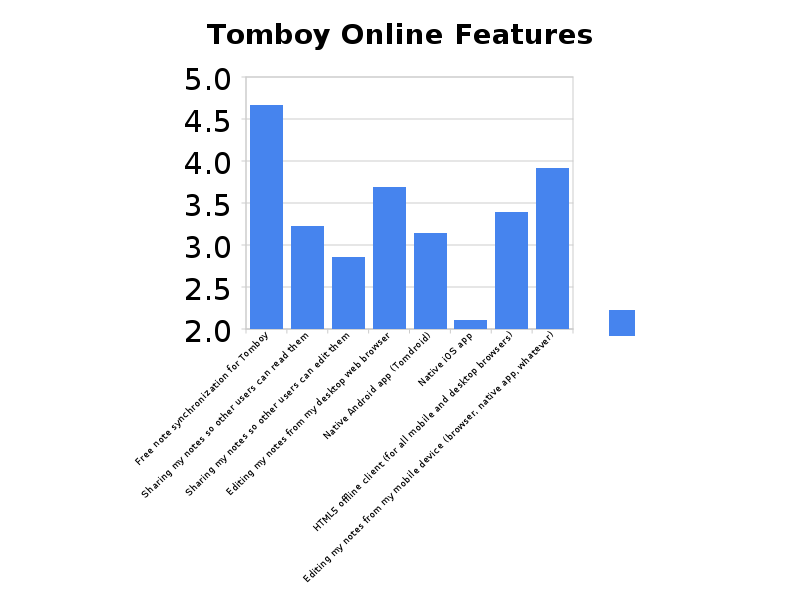
We launched the sign-ups for the upcoming Tomboy Online alpha last week. As part of the sign-up process we included a brief survey asking what features those signing up were interested in and to rate them on a scale of 1 – 5, which 5 being very interested.

We asked them to rate the following features:

  • Free note synchronization for Tomboy
  • Sharing my notes so other users can read them
  • Editing my notes from my desktop web browser
  • Native Android app (Tomdroid)
  • Native iOS app
  • HTML5 offline client (for all mobile desktop browsers)
  • Editing my notes from my mobile device (browser, native app, whatever)

Here are the results:

Tomboy Online Features

(If it’s hard to read, here is link to the png file too, squint really hard)

It’s a fairly small sample, but I’m still please to see so little interest in iOS and a huge interest in Android and HTML5.

Snowy was approved for a hackfest at the Boston Summit. The hackfest goals include match up nicely with the survey results. The goals include:

  • Mobile client for accessing and syncing notes
  • Implement UI / Design via CSS
  • Implement a text editor
  • Implement note sharing between users via the web interface
  • Prepare Tomboy Online for Beta release

And if there are any companies that want to help sponsor the hackfest, please let me or Stormy know!

We’re excited to be working on a web service that integrates with the GNOME Desktop. We have one bug to fix that’s delayed the alpha launch slightly. Thanks to everyone who has signed up and we’ll get the invites out ASAP.

Collaboration Across Borders

I’ve been a bit of a distro-hopper over the last year, but as I started interviewing at Novell earlier this year I started using openSUSE so I could pretend to know what I was talking about if it came up during the interview process.

I’ve been really happy with openSUSE – each distro has their quirks but there’s a number of things (especially the openSUSE Build Service!) it does well.

I’ve also enjoyed lurking in the openSUSE GNOME community. When I’ve been stuck with something I’ve gotten quick answers and they’ve been very welcoming. (Well, except Vincent – he took one look at what I did to my laptop at the Marketing hackfest and ran away. Ok, that’s not true, he fixed it as he usually does).

One of the cool things the openSUSE community is doing is organizing the second annual openSUSE conference later this year from October 21st – 23rd in Nuremberg, Germany.

The theme is “Collaboration Across Borders” and this goes beyond just openSUSE – one of the tracks being tentatively planned is called “Cross Pollination” and the goal is to have multiple distributions and upstream projects under one roof. There will be open discussions and meetings, presentations and maybe even some hacking together. (For those of you hoping for a cagematch fight, sorry!)

Potential topics could include anything from accessibility to how to handle zealots in your community to what holds a project back to brainstorming about how closed competition might do better and how our projects can improve.

If this sounds like something you may be interested in presenting at – no matter what distribution you may use or support – distributions and upstream projects welcome! – email cfp@opensuse.org to propose a talk.

Thanks to FunkyPenguin aka awafaa for passing this along.

Hobbyists & Hackers

Dave Neary wrote an interesting blog post yesterday commenting that the recruitment of new developers appears to be slowing.

I’ve had similar a similar thought on my mind for a while but coming from a different angle.

First though, revisiting Dave’s thought, he writes:

But it was a learning experience. Installing Linux was the period in my life where I learned the most about how computers worked, hardware and software. Back then, if you wanted to try out an application you heard about, there was only one way to do it – download the source code and compile it.

I had a conversation with Jono Bacon and Opportunistic Development (more on this in a different post) at the Linux Foundation Collaboration Summit two weeks ago that comes to mind.  Jono and I were talking about how kids in the 80’s had a chance to learn to program through BASIC, LOGO or other languages.  I remember using my first computer and buying magazines that had the machine code you’d program in by hand to create a game.  (Ok, I’m old).

But it leads me to an interesting thought about the evolution of younger users and how they are introduced to computers, becoming programmers and ultimately hackers or makers.

  • In the early 80’s we had the TRS-80, Commodore or Apple II (and later the Atari ST or IBM PC) computers and were encouraged to learn Basic or LOGO
  • In the 90’s we saw the beginning of Linux and other free software tools that raised a different generation of hackers.  We had the World Wide Web explode creating a generation of Web programmers.
  • And in the first decade of the 21st century, especially the second half, we saw the rise of the smartphone and the app store.

Dave asks the question:

Is it any wonder that recruitment of developers appears to be slowing, that prominent older projects are suffering something of a demographic crisis, with hoary old 30 year olds holding down the fort, with no young fiery whippersnappers coming up to relieve them?

(And I encourage you to read the comments on his blog as well).  I don’t know if that’s the right question – I think the fiery whippersnappers have more choices today for development – web apps, iPhone or Android apps, Linux and more.

For the GNOME community specifically, I wonder if we could make it easier for new developers or projects.  As an upstream project, I understand we don’t want to make it too easy and have a wasteland of abandoned projects hosted on our infrastructure, but I also see innovative new projects like Zeitgeist or Getting Things GNOME! using Launchpad instead.  I think the recent Zeitgeist proposal highlights both the benefits and challenges of using one or the other platforms for development.  I don’t know what the answer is, but I’d be curious to hear the communities opinion on it, whether it’s opening a GNOME branch on Gitorious or other ideas.

From whatever direction you come at these questions, it is an interesting challenge to have.

Cutting the Cable, Part 2

A few weeks ago I blogged about buying the hardware to set up a MythTV PC to record off air high def TV and integrate it with Boxee.

The hardware arrived and I’ve been working on on the setup off and on over the last few weeks. Some random thoughts:

  • The HD Homerun tuner is pretty cool. Fedora has the HD Homerun configuration tool in their repos. Installing that through PackageKit and yum made it easy to test out that it was working and had a good signal.
  • I had to install MyTV 3 times before I could get it to work. On a vanilla Fedora 12 install and then adding MythTV from the repos, only one tuner of the HD Homerun would work. Trying Mythdora, my MythTV front ends on my desktop PC and my laptop wouldn’t connect. Also there was a nasty bug in Mythdora’s kernel that wouldn’t let me mount a NFS share. Using Mythbuntu everything just worked.
  • Schedules Direct is a pretty cool service. I remember hearing about the story a couple years ago when it all went down, but when Zap2It started charging users for the scheduling data, a group of MythTV users started Schedules Direct and licensed the data. $20 / year is more than reasonable to pay to get all the scheduling data.
  • I love the fact that I can browse to the IP address of the MythTV PC from any computer and see the scheduling data and record a show. It took a few minutes to find the setting to only record new episodes, but it’s there! Obligatory screenshot:

    mythtv-schedule

    • The first recordings I made were the second night of the 24 season premiere and an episode of How I Met Your Mother. A one hour recording is about 6 GB.
    • I only have a 100GB hard drive in the MythTV backend, so I mounted my NAS via NFS . I would then in Boxee use the File Browser and surf to my tv recording directory. One downside to this method is that MythTV records the file, such as last week’s 24 as 1091_2010011819000mpg. The File Browser also displays a PNG file so it’s easy to tell what show is what, but it’s not intuitive at all.
    • There are plugins for XBMC, such as MythSExx and MythicalLibrarian that will rename your TV recordings into a S01E01 format and create a symlink for you to make it easier to browse your recordings. I couldn’t get the former script to run, but I didn’t spend a lot of time troubleshooting either.

And then yesterday while idling in #boxee on Freenode IRC, user SpaceBass mentioned that MythTV support was working for him in the Boxee Beta. There are a number of threads in the Boxee forums that the “mythtv://” protocol doesn’t work – but it appears to be working now.

In the Boxee settings, add a manual souce, and make it: myth://IPADDRESS where IPADDRESS is the IP address of your Myth backend and give the source a name – I used “DVR”.

Now use the File Browser in Boxee and when you first choose it you’ll have a list of your sources:

IMG_4870.JPG

Select DVR and you’ll be presented with “All Recordings”, “Guide”, “Live Channels”, “Movies” and “TV Shows”:

IMG_4871.JPG

Note: Guide doesn’t work for me.

If you choose “All Recordings” you’ll see everything that MythTV has recorded:

IMG_4872.JPG

(TV Shows and Movies will just show the MythTV recordings based on those filters). I haven’t looked into using MythTV’s built-in commercial skip as Boxee has a 30 second skip that just works too. I also like that Boxee remembers to resume where I left off watching if I stop playback.

To watch Live TV streaming from your Myth backend to Boxee, choose Live TV from the menu I mentioned above. You’ll be presented with a list of TV channels by station ID, not number:

IMG_4873.JPG

And here’s a screenshot of the NHL game on NBC in HD earlier this afternoon:

IMG_4874.JPG

There are two bugs I’m experiencing that I need to spend some time with:

  • When playing back a recording or starting a live TV stream, it will sometimes start as if it’s being fast-forwarded, including the audio. Hitting pause and then unpausing fixes it.
  • I think this may be related to signal strength as I’m seeing it on NBC and CBS, but not Fox, but I’m seeing jagged edges around an object, such as a person, when it’s moving quickly. If it’s a fairly static image, there are no jagged edges. But even someone quickly sitting down will have the distortion. But I don’t see this problem when accessing the recording from a Myth frontend on another computer, so it needs more investigating.
  • My other theory is it could have something to do with saving the content on the NAS and not on a hard drive in the Myth backend, so I bought a larger hard drive to throw in there too. I’d also rather have it on a hard drive than the NAS just to save wear and tear.

I’m almost done – if I had to guess, I’m about a week away from telling DirecTV to pound sand. I’ll poke at the distortion issue some more and install that hard drive when it arrives but this has been a pretty cool project to work on so far.

Mallard Documentation

Did anyone watch The Office last Thursday night? Early in the episode, Dwight gives Jim a wood duck with a walkie-talkie built-in so Dwight can spy on Jim.

Jim: Thanks for the duck

Dwight: It’s not a duck, it’s a mallard!

This had me chuckling thinking about Mallard documentation. For the record, mallards are a much more beautiful duck than wood ducks.

There’s been a lot going on in the world of GNOME documentation. Mallard has been getting a lot of buzz, in the #docs IRC channel, on Twitter and identi.ca, the mailing list and blogs. People have taken notice of the new Empathy documentation with its new layout and focus on topic based documentation.

Here’s just a few of the things going on:

  • We’ve expanded our monthly GNOME Docs meetings, and we’re practically meeting every other week now. We’ll be having a working session in our next meeting November 8th focused on what a new GNOME User Guide (Shaun hates calling it a User Guide!) will look like for GNOME 3.0. Shaun came back from the Boston Summit with lots of ideas and discussions around user help and the work we’ll need to do for GNOME 3.0.
  • Milo Casagrande, author of the new Empathy help, recently blogged about his experience in writing the Empathy help. He includes the process he went through, writing per page topics and also includes code samples. If you’re looking into getting involved in writing GNOME documentation, his blog is a must read.
  • For the GNOME 2.29 cycle, I’m committed to writing new Tomboy help in Mallard as well as adding help to Banshee for the first time. I’m starting with Tomboy as its help is a bit more basic than Banshee which has more advanced features. I’ve created a docs branch in Tomboy’s GNOME git and have been adding pages over the last week or two to get up to speed on Mallard. I have to say, writing docs in Mallard is ten times easier than Docbook. The XML markup just makes sense and is so much simpler than Docbook.
  • For Banshee, I have a git branch on Gitorious. I’ve checked out the code again after not working on it for a couple of months and have started working on it.
  • Nigel hooked some members of the Docs team up with Google Wave invites. It’s been interesting trying out Wave for collaboration for Docs writing. Not so much writing the actual documentation, but it’s been helpful for planning the pages, which is the most important part of any writing. With us half a world apart we haven’t really had a chance to use Wave for real time collaboration which I think it’s more suited for, but it’s been helpful. At this point a wiki would probably work just as well, but I do like the threaded view which makes it easier to see when changes or updates were made in Wave.
  • Shaun is off working feverishly on a new Yelp help browser for GNOME 3.0. Details are scarce at this point, but he seems excited.
  • We’ve also launched ProjectMallard.org. It’s our goal that the Mallard XML schema is used in more than just GNOME. It’s early in Mallard’s development so no big announcements, but it’s helpful to think about user help in FOSS on a greater scale. The webpage is just a place holder at this point, but we have plans to add information on what Mallard is, how to get started including code samples, tools, specifications, extensions and more.
  • We’re planning on having a GNOME Docs meetup in Chicago on November 9th prior to the marketing hackfest. Jim Campbell from XFCE might stop by but unfortunately Nixternal of KDE fame will be out of town.

Now is a great time to get involved with GNOME Documentation. Stop by on IRC in #docs on GimpNET or join the mailing list, we’d love to share what is going on with Mallard and how we are planning to make user help a better experience.